

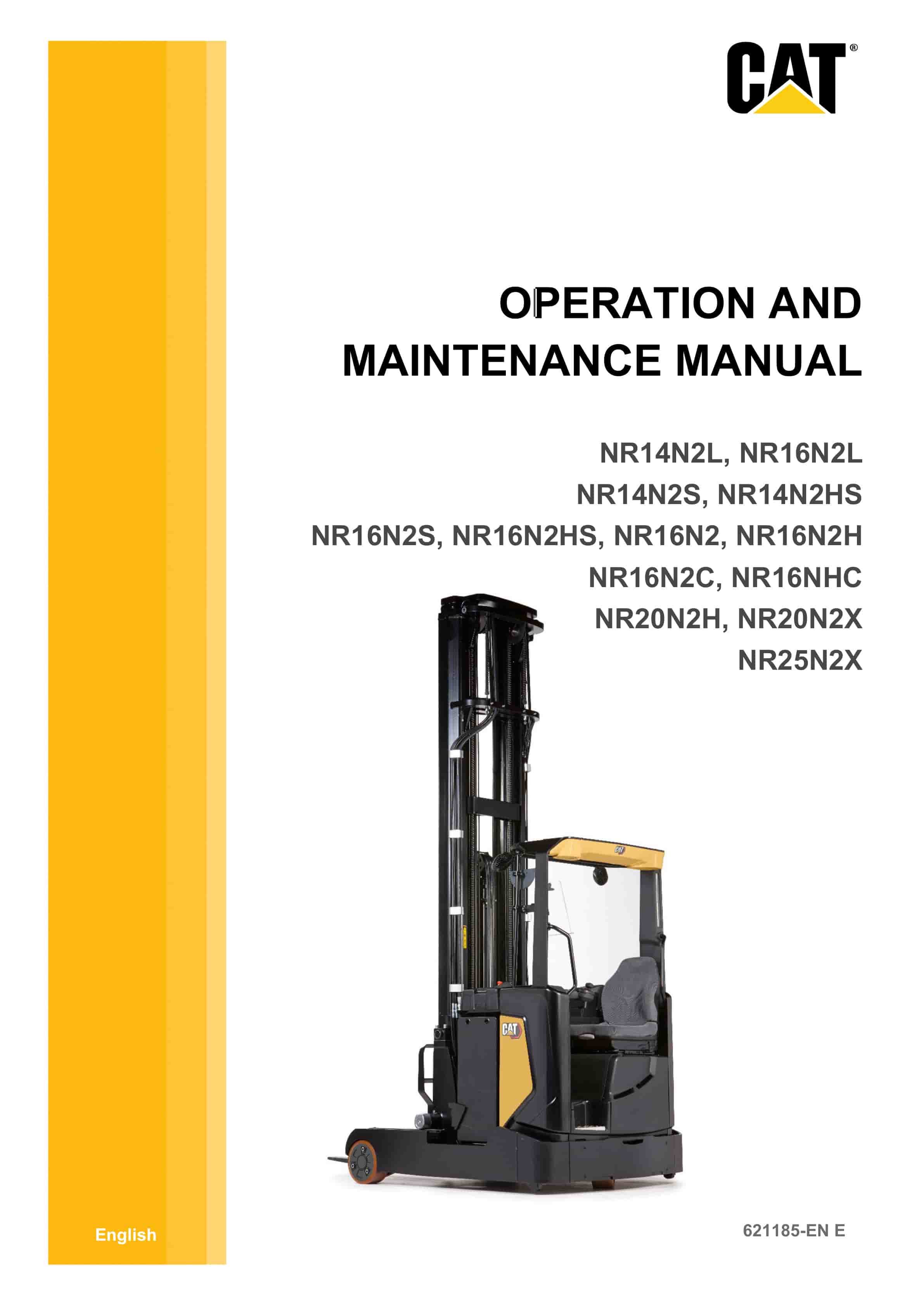
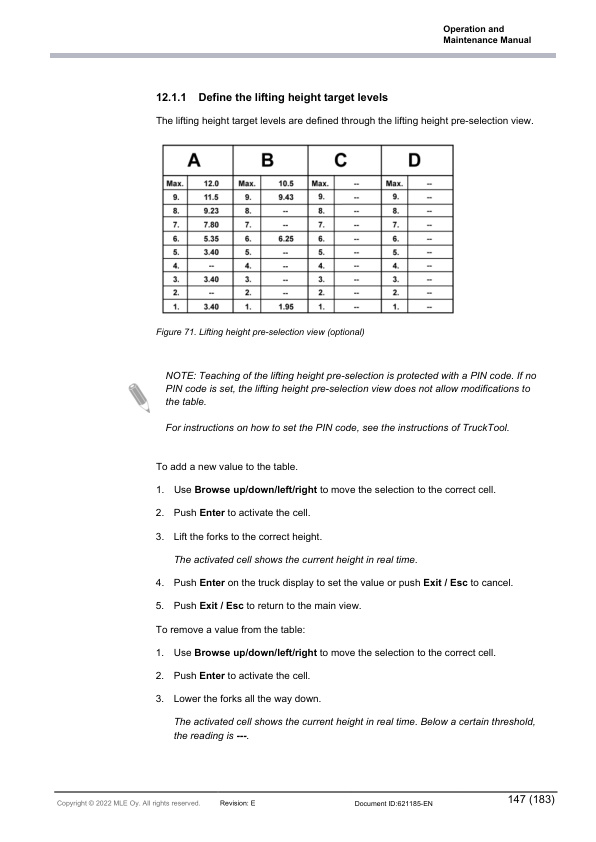
Caterpillar NR14N2L to NR25N2X Operation and Maintenance Manual 621185 EN-E
$30.00
- Type Of Manual: Operation and Maintenance Manual
- Manual ID: 621185
- Language: EN-E
- Number of Pages: 183
- Size: 21.4MB
- Format: PDF
Product details
-
Model List:
- NR14N2L, NR16N2L, NR14N2S, NR14N2HS, NR16N2S, NR16N2HS, NR16N2, NR16N2H, NR16N2C, NR16NHC, NR20N2H, NR20N2X, NR25N2X
- 1. Contents
- 2. Foreword
- 3. How to read this manual
- 3.1. Safety-related signs
- 3.2. Symbols and abbreviations
- 3.2.1. Safety symbols
- 4. Safety instructions
- 4.1. Safety requirements for industrial trucks
- 4.2. Electromagnetic compatibility
- 4.3. Non-ionizing radiation
- 4.4. Noise
- 4.5. Vibration
- 4.6. Instructions for site supervision
- 4.7. Occupational safety
- 4.8. Requirements for the truck operator
- 4.9. Emergency procedures
- 4.10. Stability
- 4.10.1. Center of gravity
- 4.10.2. Capacity of the lift truck
- 4.11. Work at dangerous premises
- 4.12. Repairs and structural modifications
- 5. Operating environment
- 5.1. Surface requirements
- 5.2. Bearing capacity of the floor
- 5.3. Operating temperature
- 5.4. Wind forces
- 5.5. Lighting
- 5.6. Driveways
- 5.7. Free space
- 5.8. Ramps
- 5.9. Loading bridges
- 5.10. Elevators
- 6. General information
- 6.1. Truck
- 6.1.1. Intended use
- 6.1.2. Prohibited use
- 6.2. Identification plates on the truck
- 6.3. Overview of the truck
- 6.3.1. Overhead guard
- 6.3.2. Load backrest
- 6.3.3. Cabin (option)
- 6.3.4. Emergency exits (cabin truck only)
- 6.3.5. Operating devices
- 6.3.6. Control panel
- 6.3.7. Steering wheel
- 6.3.8. Armrest
- 6.3.9. Dual joystick armrest
- 6.3.10. Display panel
- 6.3.11. Truck operation modes
- 6.3.12. Truck display
- 6.3.12.1. Display control buttons
- 6.3.12.2. Main view of the truck display
- 6.3.12.3. Hierarchy of the truck display menus
- 6.3.13. Pedals
- 6.3.13.1. Accelerator pedal, operator pedal and brake pedal
- 6.3.13.2. Dual pedal and brake pedal
- 6.3.13.3. Pedal functionalities
- 6.3.14. Operators seat
- 6.3.15. Drive unit, hydraulic system and instrument panel
- 6.3.15.1. Instrument panel
- 6.3.15.2. Hydraulic system
- 6.3.15.3. Drive unit
- 6.3.16. Mast
- 7. Assembly and commissioning
- 8. Batteries
- 8.1. Lead-acid batteries
- 8.1.1. General information
- 8.1.2. Safety signs for lead-acid batteries
- 8.1.3. Requirements for the battery charging areas
- 8.1.4. Charge the battery
- 8.1.5. Measure the specific gravity of the battery water
- 8.1.6. Battery maintenance
- 8.1.6.1. How to clean batteries with a damp cleaning cloth
- 8.1.6.2. How to clean batteries with high-pressure cleaning equipment
- 8.1.6.3. Daily maintenance
- 8.1.6.4. Weekly maintenance
- 8.1.6.5. Monthly maintenance
- 8.1.6.6. Annual maintenance
- 8.1.7. Malfunctions
- 8.1.8. Acquire a new battery
- 8.1.9. Replace the battery
- 8.1.9.1. Quick battery replacement
- 8.1.10. Guide the battery connector cables
- 8.1.11. Storage
- 8.2. Lithium-ion batteries
- 8.2.1. General information
- 8.2.2. Safety signs
- 8.2.3. Requirements for the battery charging areas
- 8.2.4. Charge the battery
- 8.2.4.1. Recharging a lithium-ion battery
- 8.2.4.2. Before charging
- 8.2.4.3. After charging
- 8.2.4.4. Opportunity charging
- 8.2.4.5. Battery balancing
- 8.2.4.6. Malfunctions
- 8.2.5. Battery maintenance
- 8.2.5.1. Check the battery
- 8.2.5.2. How to clean the battery
- 8.2.6. Service and repair
- 8.2.7. Replace the battery
- 8.2.8. Acquire a new battery
- 8.2.9. Storage
- 9. Before operation
- 9.1. Daily maintenance before operation
- 9.2. Operator compartment adjustments
- 9.2.1. Adjust the armrest
- 9.2.2. Adjust the operators seat (MSG20)
- 9.2.2.1. Adjust the operators seat suspension according to the weight of the operator (MSG20)
- 9.2.2.2. Adjust the backrest (MSG20)
- 9.2.2.3. Adjust the seat distance (MSG20)
- 9.2.2.4. Clean the operators seat
- 9.2.3. Adjust the operators seat (MSG65/MSG75)
- 9.2.3.1. Adjust the operators seat suspension according to the weight of the operator (MSG65/MSG75)
- 9.2.3.2. Adjust the backrest (MSG65/MSG75)
- 9.2.3.3. Adjust the seat distance (MSG65/MSG75)
- 9.2.3.4. Adjust the lumbar support (MSG65/MSG75)
- 9.2.3.5. Clean the operators seat
- 9.2.4. Seat belt
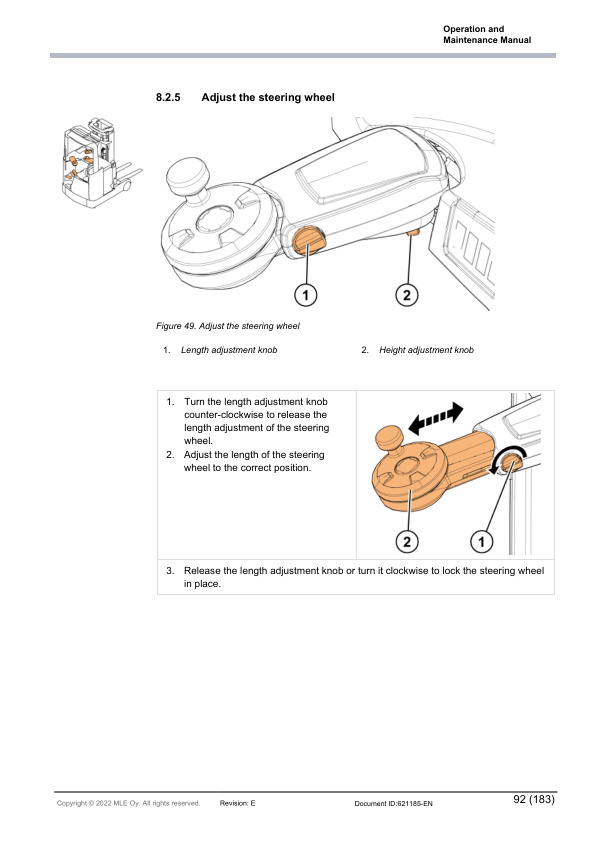
- 9.2.5. Adjust the steering wheel
- 9.2.6. Adjust the heater (cabin truck only)
- 9.2.7. Open the roof window (cabin truck only)
- 10. Operating instructions
- 10.1. How to operate the truck
- 10.1.1. How to enter and exit the operators compartment
- 10.1.2. Operating position
- 10.1.3. Operating direction
- 10.2. How to activate the truck
- 10.2.1. Activate the truck with a PIN code
- 10.2.2. Deactivate the truck
- 10.2.3. Program a new PIN code
- 10.3. Brakes
- 10.3.1. Service brake
- 10.3.2. Parking brake
- 10.4. Driving
- 10.4.1. General driving instructions
- 10.4.2. How to drive the truck
- 10.4.3. Speed
- 10.4.4. How to stop the truck
- 10.4.5. How to park the truck
- 10.5. General operating instructions
- 10.5.1. Traffic rules
- 10.5.2. How to avoid accidents
- 10.5.3. In case the truck turns over
- 10.6. How to handle loads
- 10.6.1. Lifting capacity
- 10.6.2. How to stack
- 10.6.3. How to unstack
- 10.6.4. Broken pallets
- 11. Maintenance
- 11.1. Safety instructions for maintenance
- 11.2. Scheduled maintenance
- 11.2.1. Daily maintenance
- 11.2.2. Weekly checks
- 11.2.3. Monthly maintenance
- 11.2.4. Annual (or 1,000 h) maintenance
- 11.2.5. Every second year (or 2,000 h) maintenance
- 11.3. Lubricant recommendation
- 11.3.1. Hydraulic oil
- 11.3.2. Transmission oil
- 11.3.3. Heavy duty grease for slewing bearing
- 11.3.4. Pump axle splines
- 11.3.5. Traction motor axle splines
- 11.3.6. Mast chains
- 11.3.7. Mast channels
- 11.4. Order spare parts
- 11.5. Maintenance operations
- 11.5.1. Truck covers
- 11.5.1.1. Remove the machinery cover
- 11.5.1.2. Remove the front bumper
- 11.5.1.3. Remove the floor plate
- 11.5.1.4. Open the machinery top cover
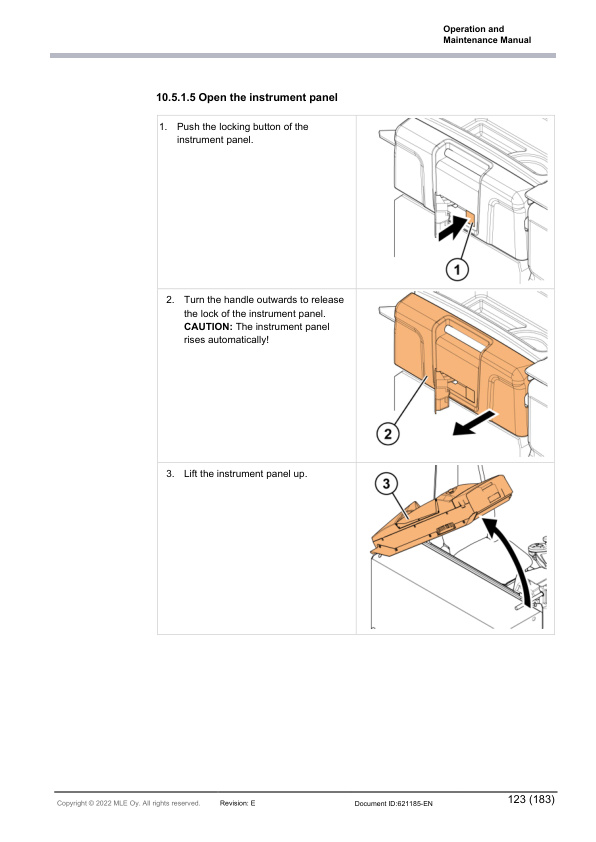
- 11.5.1.5. Open the instrument panel
- 11.5.1.6. Remove the instrument panel cover
- 11.5.1.7. Remove the control panel
- 11.5.1.8. Remove the cup holder
- 11.5.1.9. Remove the reach carriage cover
- 11.5.2. Cabin covers (cabin truck only)
- 11.5.2.1. Remove the instrument panel cover
- 11.5.2.2. Remove the ceiling cover
- 11.5.3. Location of the fuses in the instrument panel
- 11.6. Hazardous waste and disposal
- 11.7. Maintenance check list
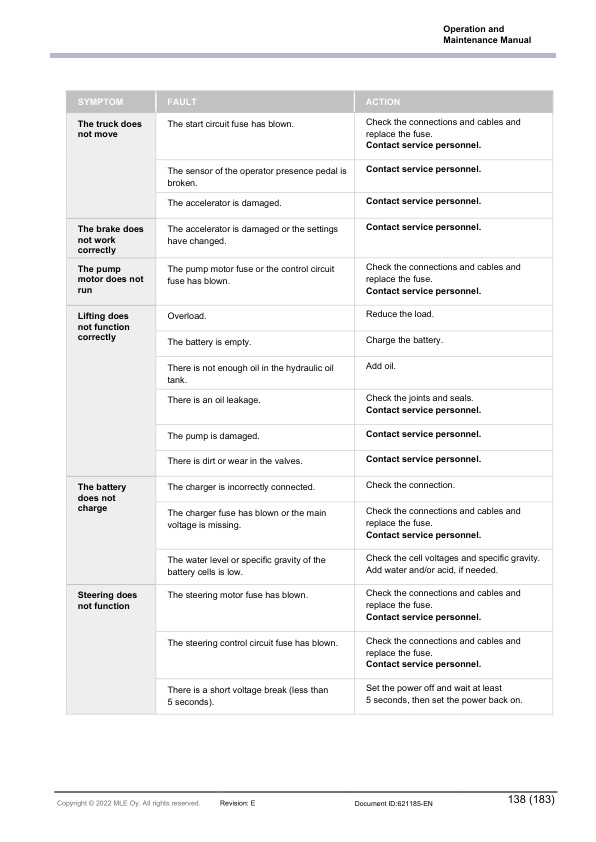
- 11.8. Troubleshooting
- 12. Transportation and storage
- 12.1. Lifting points
- 12.1.1. Jack points
- 12.1.2. Hoist points
- 12.2. How to tow the truck
- 12.2.1. Release the magnetic brake manually
- 12.3. Transportation
- 12.4. Storage
- 12.4.1. Return the truck to operation
- 12.5. Decommissioning
- 13. Options
- 13.1. Lifting height pre-selection
- 13.1.1. Define the lifting height target levels
- 13.1.2. How to unstack with the lifting height pre-selection
- 13.1.3. How to stack with the lifting height pre-selection
- 13.2. Sideshift and tilt centering
- 13.2.1. Center the forks with the sideshift and tilt centering
- 13.3. Load weight indicator
- 13.4. Battery changing device for 2 batteries
- 13.4.1. Remove an empty battery with the battery changing device for two batteries
- 13.4.2. Install a charged battery with the battery changing device for two batteries
- 14. Technical specifications
- 14.1. Dimensions
- 14.2. Technical data
- 14.3. Mast heights
- 15. Declaration of Conformity
- 16. Index
- 17. APPENDIX A Stickers
Related products
-
Caterpillar 4.236 Gasoline Engine Disassembly and Assembly SENB8097
$30.00 Add to cart -
Caterpillar 3208, 3208T Vehicular Engines Disassembly and Assembly SENB8324
$30.00 Add to cart -
Caterpillar DP100, DP115, DP135, DP150 Lift Trucks Operation and Maintenance Manual 99790-83110
$30.00 Add to cart -
Caterpillar 3.3 Liter (4.2032) Diesel Engine Disassembly and Assembly SENB8128
$30.00 Add to cart -

Caterpillar 1404 Engine Disassembly and Assembly SENB8108-02
$30.00 Add to cart


%20Diesel%20Engine%20Disassembly%20and%20Assembly%20SENB8128&url=https://ownersmanualpdf.net/docs/caterpillar-3-3-liter-4-2032-diesel-engine-disassembly-and-assembly-senb8128/&media=https://ownersmanualpdf.net/wp-content/uploads/2025/10/caterpillar-33-liter-42032-diesel-engine-disassembly-and-assembly-senb8128-1.jpg)
